Skip to product information
The Brick

HSA / FSA eligible • 30-day money back guarantee

The Brick

$59.00
$59

Select quantity:

Customers Pair With:

How Brick Works

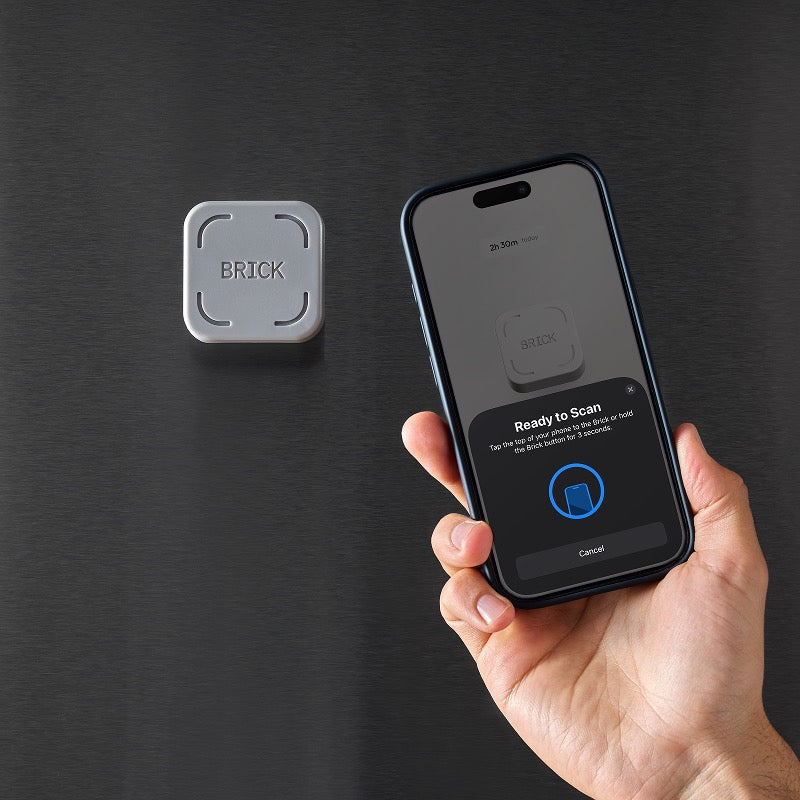
Tap your phone to The Brick to instantly block distracting apps. Tap again to unlock. The Brick has to be physically present to re-enable your apps — so leave it in another room and those apps stay locked until you walk back. Unlike any app-based blocker, you can't just override it in 10 seconds.

See how it works

Apps & Custom Modes

Choose which apps to block, or flip it and choose only the apps you want to keep — everything else gets locked. Build modes for every part of your day:

  • Work — block social, keep Slack and Maps
  • Family Time — everything off except the camera
  • Sleep — no email, no scrolling after 10pm
  • Study — one tap, zero distractions

No subscription. No recurring fees. Lifetime app access included — iOS and Android.

Build & Design
  • High-grade magnet and anti-slip silicone base
  • No charging
  • No Wi-Fi
  • No batteries

Stays put on your nightstand, desk, fridge, or dashboard — wherever you need the most accountability

The Brick

+ Free Lifetime App Access

Custom Modes
Analytics + Tracking
Available on iOS and Android
$59- Buy Now

See how Brick works

Brick in 1 minute
Step 01 Choose what to block
  • Choose which apps or websites to block in the Brick app
  • Create custom modes for different moments like Work, Family Time, or Study
  • Place your phone in Brick and tap to activate
  • When you need your phone, take it out and use it with purpose

All the features you need to focus

Easy customization

Block Instagram but keep Maps. Allow Spotify but silence Slack. Set what stays, block what doesn’t. Create modes for every part of your day—and turn your phone back into a tool.

Feel less distracted
Are more focused
Reduce their screen time

Our users see real change

95% +

Feel less distracted

93% +

Are more focused

99% +

Reduce their screen time

* Based on a survey of 3,500+ users

Our users see real change

* Based on a survey of 3,500+ users

Feel less distracted

95% +

Feel less distracted

Are more focused

93% +

Are more focused

Reduce their screen time

99% +

Reduce their screen time

What sets us apart

Screen
Time
Flip
Phone
Physical barrier
No bypass
Custom modes
Keep essentials
Limited
Track focus

More reasons to love Brick

No subscriptions

The Brick app for iOS and Android is subscription free. Buy once, use forever.

Battery-free

With no battery to charge, your Brick is always on and built to last a lifetime.

Works across devices

Use one Brick for multiple phones. Or multiple Bricks for one phone.

FAQ

How is Brick different from Apple's Screen Time or Android Digital Wellbeing?

Screen Time and Digital Wellbeing limits are easy to bypass — tap 'skip' and you're back in. Brick creates physical separation, requiring a rescan to exit, which reinforces intention and keeps temptation out of reach.

Can't I just delete the app or find a workaround?

We’ve been there too, which is why we built Brick with Strict Mode to close the loopholes and prevent deleting the app or changing settings to unbrick.

What's included with a Brick purchase?

Your purchase includes both the physical Brick and full access to the Brick app — no subscriptions, no extra fees. Buy once, use forever!

Can I use one Brick with multiple phones?

Yes! One Brick can be used with as many phones as you’d like. We are fully cross platform. Similarly, one phone can work with multiple Bricks if you'd like to have one in your home, car, or work!

What happens if I lose my Brick?

Accidents happen — so we offer five Emergency Unbricks in the app that will automatically unblock all apps.

Is my phone compatible with Brick?

Brick currently works with Android devices running version 12.0 or later and iPhones running iOS 17.0 or later.